[WordPress]記事ページを表示させる
投稿記事が表示されるまで
投稿記事のタイトルをh1で表示する
<h1><?php the_title(); ?></h1>
投稿記事の本文を表示する
<?php if(have_posts()): while(have_posts()):
the_post(); ?>
<h1><?php the_title(); ?></h1>
<?php the_content(); ?>
<?php endwhile; endif; ?>
bodyにクラス名をつける ・・・bodyに自動でクラス名が付く
<body <?php body_class(); ?>>
記事ごとに区別するために、タイトル・本文をarticleタグで囲む
<article>
<?php the_title(); ?>
<?php the_content(); ?>
</article>
<article <?php post_class(); ?>>
スタイルシートをPHPで読み込む
<link rel="stylesheet" href="<?php echo get_stylesheet_uri(); ?>">
カテゴリーを表示させる
<?php the_category( ', ' ); ?>
シングルクォーテーションをカンマで区切るのは、カテゴリーが複数の場合に区切って表示させるため。
これがない場合リストスタイルの表示になる
カテゴリーをspanタグで囲む
<span class="postcat">
<?php the_category( ', ' ); ?>
</span>
日付を表示させる
<time datetime="<?php echo get_the_date( 'Y-m-d' ); ?>">
<?php echo get_the_date(); ?></time>
日付の前に時計のアイコンを表示させる・・・font awesomeのCDNを利用する
<link rel="stylesheet" href="//maxcdn.bootstrapcdn.com/font-awesome/4.3.0/css/font-awesome.min.css">
   中略
<i class="fa fa-clock-o"></i>
CSSを書く
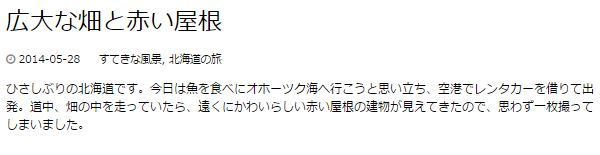
[HTML]
<!DOCTYPE html>
<html lang="ja">
<head>
<meta charset="UTF-8">
<title>ページタイトル</title>
<link rel="stylesheet" href="//maxcdn.bootstrapcdn.com/font-awesome/4.3.0/css/font-awesome.min.css">
<link rel="stylesheet" href="<?php echo get_stylesheet_uri(); ?>">
</head>
<body <?php body_class(); ?>>

<?php if(have_posts()): while(have_posts()):
the_post(); ?>

<article <?php post_class(); ?>>
<h1><?php the_title(); ?></h1>
<div class="postinfo">
<time datetime="<?php echo get_the_date( 'Y-m-d' ); ?>">
<i class="fa fa-clock-o"></i>
<?php echo get_the_date(); ?></time>
<span class="postcat">
<?php the_category( ', ' ); ?>
</span>
</div>

<?php the_content(); ?>
</article>

<?php endwhile; endif; ?>
</body>
</html>
[CSS]
@charset "UTF-8";
/*
Theme Name: My THEME
Author: ***
Description: 2015/6/24作成のテンプレート
Version: 1.0
*/

body{
  font-family:"Hiragino Kaku Gothic ProN",
  Meiryo,
  sans-serif;
}

/*記事*/
article h1{
  font-size: 32px;
  font-weight: normal;
  margin: 0;
}

/*記事の付加情報*/
.postinfo {
  font-size: 14px;
  margin-top: 15px;
}
.postinfo a {
  color: #000;
  text-decoration: none;
}
.postinfo span.postcat{
  margin-left: 20px;
}
.postinfo i{
  color: #888;
}
